instrument panel TESLA MODEL S 2018 Owner's Guide
[x] Cancel search | Manufacturer: TESLA, Model Year: 2018, Model line: MODEL S, Model: TESLA MODEL S 2018Pages: 195, PDF Size: 5.51 MB
Page 81 of 195
never depend on Overtake Acceleration
to increase your driving speed.Warning: Overtake Acceleration increases
your driving speed whenever the
appropriate turn signal is engaged, and
accelerates Model S closer to the vehicle
ahead. Although
Traffic-Aware Cruise
Control continues to maintain distance
from the vehicle ahead, it is important to
be aware that your selected following
distance is reduced when Overtake
Acceleration is active, particularly in cases
where it may not be your intention to
overtake the vehicle you are following.
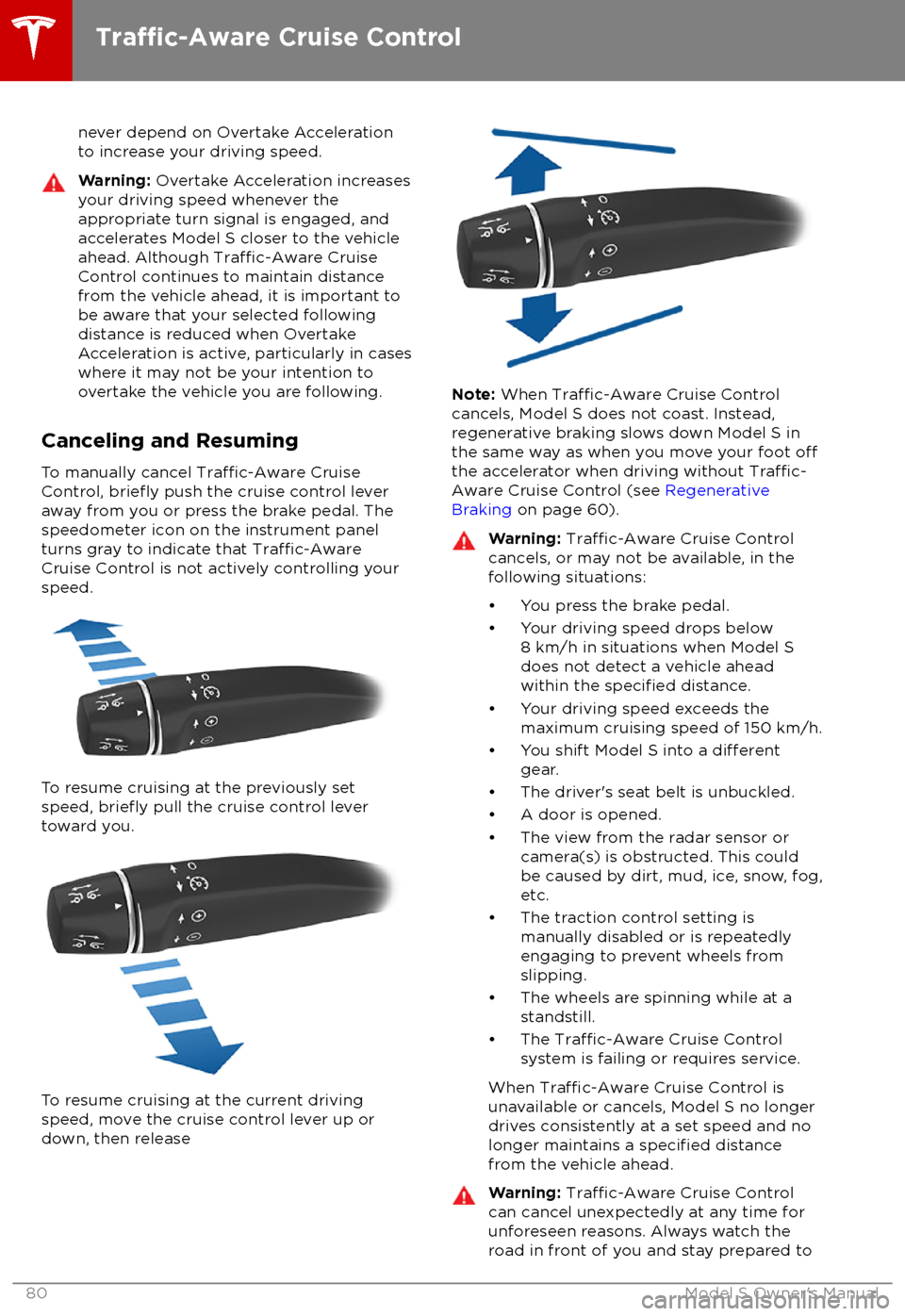
Canceling and Resuming
To manually cancel
Traffic-Aware Cruise
Control, briefly push the cruise control lever
away from you or press the brake pedal. The
speedometer icon on the instrument panel
turns gray to indicate that
Traffic-AwareCruise Control is not actively controlling your
speed.
To resume cruising at the previously set
speed, briefly pull the cruise control lever
toward you.
To resume cruising at the current driving speed, move the cruise control lever up or
down, then release
Note: When Traffic-Aware Cruise Control
cancels, Model S does not coast. Instead,
regenerative braking slows down Model S in
the same way as when you move your foot
offthe accelerator when driving without Traffic-
Aware Cruise Control (see Regenerative
Braking on page 60).
Warning: Traffic-Aware Cruise Control
cancels, or may not be available, in the
following situations:
Page 92 of 195

If your Model S is equipped with Driver
Assistance components (see About Driver
Assistance on page 73), the cameras monitor
the markers on the lane you are driving in and the ultrasonic sensors monitor the
surrounding areas and the blind spot for the
presence of a vehicle or other objects.
When an object is detected in your blind spot
or close to the side of Model S (such as a vehicle, guard rail, etc.), colored lines radiate
from the image of Model S on the instrument
panel. The location of the lines correspond to
the location of the detected object. The color
of the lines (white, yellow, orange, or red)
represents the object
Page 98 of 195
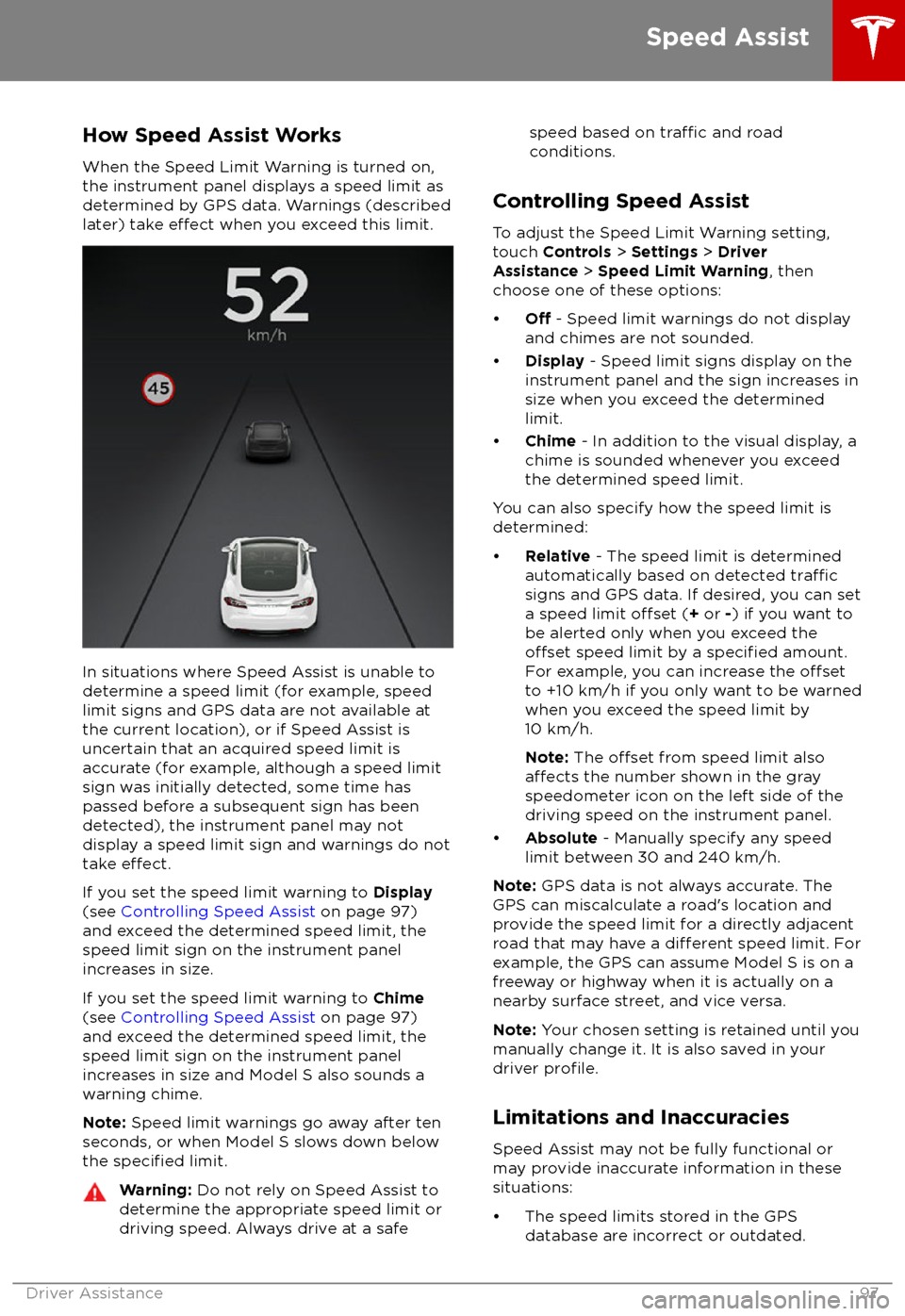
How Speed Assist Works
When the Speed Limit Warning is turned on,
the instrument panel displays a speed limit as
determined by GPS data. Warnings (described
later) take
effect when you exceed this limit.
In situations where Speed Assist is unable to determine a speed limit (for example, speed
limit signs and GPS data are not available at
the current location), or if Speed Assist is
uncertain that an acquired speed limit is
accurate (for example, although a speed limit sign was initially detected, some time has
passed before a subsequent sign has been
detected), the instrument panel may not
display a speed limit sign and warnings do not take
effect.
If you set the speed limit warning to Display
(see Controlling Speed Assist on page 97)
and exceed the determined speed limit, the
speed limit sign on the instrument panel
increases in size.
If you set the speed limit warning to Chime
(see Controlling Speed Assist on page 97)
and exceed the determined speed limit, the
speed limit sign on the instrument panel
increases in size and Model S also sounds a
warning chime.
Note: Speed limit warnings go away after ten
seconds, or when Model S slows down below
the
specified limit.
Warning: Do not rely on Speed Assist to
determine the appropriate speed limit or driving speed. Always drive at a safespeed based on traffic and road
conditions.
Controlling Speed Assist
To adjust the Speed Limit Warning setting,
touch Controls > Settings > Driver
Assistance > Speed Limit Warning , then
choose one of these options:
Page 107 of 195

7.Displays
Manually control the brightness and the Day (light background) or Night (dark background)
setting of the touchscreen and instrument panel. When set to Auto, the brightness changes
automatically between day and night brightness based on ambient lighting conditions. When
Auto-adjust is checked, the displays are further adjusted based on both the surroundings and
by learning your preferences (i.e. it remembers the type of manual adjustments you make).
To disable the touchscreen momentarily for cleaning purposes, touch Clean Mode.
You can also put Model S into an energy saving mode so it consumes less energy when not in
use (see Getting Maximum Range on page 70).
Note: The Displays settings can also be accessed from the Settings screen.
8. E-Brake & Power
Off
You can manually:
Page 111 of 195

7.Displays
Manually control the brightness and the DAY (light background) or NIGHT (dark background)
setting of the touchscreen and instrument panel. When set to AUTO, the brightness changes
automatically between day and night brightness based on ambient lighting conditions. When
Auto-adjust is checked, the displays are further adjusted based on both the surroundings and
by learning your preferences (i.e. it remembers the type of manual adjustments you make).
To disable the touchscreen momentarily for cleaning purposes, touch CLEAN MODE.
You can also put Model S into an energy saving mode so it consumes less energy when not in
use (see Getting Maximum Range on page 70).
Note: The Displays settings can also be accessed from the Controls screen.
8. HomeLink (if equipped)
If the HomeLink feature is available in your region, use it to control RF-enabled garage doors, lights, or security systems (see HomeLink Universal Transceiver on page 133).
9. Driver Assistance
If Model S is equipped with Driver Assistance components, you can control the features that provide a safer and more convenient driving experience (see About Driver Assistance on page
73).
10. Service & Reset
Turn various service-related features on and
off:
Page 145 of 195

Changing Charge Settings
The charge settings screen displays on the
touchscreen whenever the charge port door is
open.
To display charge settings at any time, touch
the Battery icon on the top of the
touchscreen, or touch Controls > Charging
(located in the upper right portion of the
Controls screen).
Note: The following illustration is provided for
demonstration purposes only and may vary
slightly depending on software version and
market region.
Note: If charging at a Tesla Supercharger, and
paid supercharging is potentially in effect, the
charging screen also displays information
about your previous or current Supercharger
session (see Supercharger Usage Fees and
Idle Fees on page 146).
1. Charge status messages (such as
Charging Scheduled, Charging In
Progress) display here.
2. To adjust the charge limit, touch Set
Charge Limit , and drag the arrow to
change the charge limit setting. The
setting you choose applies to immediate and scheduled charging sessions.
3.Location-specific schedule. With Model S
in Park, set a specific time to begin
charging at the current location. If, at the
scheduled time, Model S is not plugged in
at the location, charging starts as soon as
you plug it in provided you plug it in
within six hours of the scheduled time. If
plugged in after six hours, charging does
not start until the scheduled time on the next day. To override this setting, touchStart Charging or Stop Charging (see
item 4). When you set a scheduled
charging time, Model S displays the set
time on the instrument panel and
touchscreen.
4. Touch to open the charge port door or to
start (or stop) charging.
5. Charging rate per hour, estimated increase
in driving distance (or energy) achieved
so far in this charging session, current
supplied/available from the connected
power supply, and voltage supplied by the
charge cable.
6. The current automatically sets to the
maximum current available from the
attached charge cable, unless it was
previously reduced to a lower level. If
needed, touch the up/down arrows to
change the current (for example, you may
want to reduce the current if you are
concerned about overloading a domestic
wiring circuit shared by other equipment).
It is not possible to set the charging
current to a level that exceeds the
maximum available from the attached charge cable. When you change the
current, Model S remembers the location.
If you charge at the same location, you do
not need to change it again.
Note: For 3-phase charging, the available
current represents the current per phase
(up to 32 amps). During charging, the
right status
flag displays the 3-phase
symbol in front of the displayed current.
Note: If Model S automatically reduced
the current at a charging location because
of
Page 156 of 195

Cleaning the Interior
Frequently inspect and clean the interior to maintain its appearance and to prevent
premature wear. If possible, immediately wipe up spills and remove marks. For general
cleaning, wipe interior surfaces using a soft
cloth (such as
microfiber) dampened with a
mixture of warm water and mild non-
detergent cleaner (test all cleaners on a
concealed area before use). To avoid streaks,
dry immediately with a soft lint-free cloth.
Interior Glass
Do not scrape, or use any abrasive cleaning
fluid on glass or mirrored surfaces. This can
damage the reflective surface of the mirror
and the heating elements in the rear window.
Airbags
Do not allow any substance to enter an airbag
cover. This could
affect correct operation.
Dashboard and Plastic Surfaces
Do not polish the upper surfaces of the
dashboard. Polished surfaces are
reflectiveand could interfere with your driving view.
Leather Seats
Leather is prone to dye-transfer which can
cause discoloration, particularly on light colored leather. White and tan leather iscoated with an anti-soiling treatment. Wipespills as soon as possible using a soft cloth
moistened with warm water and non-
detergent soap. Wipe gently in a circular
motion. Then wipe dry using a soft, lint-free
cloth. Using detergents or commercially
available leather cleaners and conditioners is
not recommended because they can discolor or dry out the leather.
Polyurethane Seats
Wipe spills as soon as possible using a soft
cloth moistened with warm water and non-
detergent soap. Wipe gently in a circular
motion. After cleaning, allow the seats to air
dry.
Cloth Seats
Wipe spills as soon as possible using a soft
cloth moistened with warm water and non-
detergent soap. Wipe gently in a circular
motion. Then wipe dry using a soft, lint-free
cloth. Vacuum the seats as needed to remove
any loose dirt.
Carpets
Avoid over-wetting carpets. For heavily soiled
areas, use a diluted upholstery cleaner.
Seat Belts
Extend the belts to wipe. Do not use any type
of detergent or chemical cleaning agent.
Allow the belts to dry naturally while
extended, preferably away from direct
sunlight.
Tesla Built-In Rear Facing Child Seats
Vacuum the seats to remove any loose dirt. Wipe the seats with a soft cloth dampened
with warm water. You can also use an upholstery cleaner designed for automotive
use. Extend the belts to wipe. Allow the belts
to dry naturally, preferably away from direct
sunlight.
Touchscreen and Instrument Panel
Clean the touchscreen and instrument panel
using a soft lint-free cloth
specificallydesigned to clean monitors and displays. Do not use cleaners (such as a glass cleaner) and
do not use a wet wipe or a dry statically- charged cloth (such as a recently washed
microfiber). To wipe the touchscreen without
activating buttons and changing settings, you
can enable clean mode. Touch Controls >
Displays > Clean Mode . The display darkens to
make it easy to see dust and smudges.
Chrome and Metal Surfaces
Polish, abrasive cleaners or hard cloths can
damage the
finish on chrome and metal
surfaces.
Cautions for Interior Cleaning
Caution: Using solvents (including
alcohol), bleach, citrus, naphtha, or silicone-based products or additives on
interior components can cause damage.Caution: Statically-charged materials can
cause damage to the touchscreen or
instrument panel.Warning: If you notice any damage on an
airbag or seat belt, contact Tesla
immediately.Warning: Do not allow any water,
cleaners, or fabric to enter a seat belt
mechanism.Warning: Exposure to chemical cleaners
can be hazardous and can irritate eyes
Cleaning
Maintenance155
Page 160 of 195
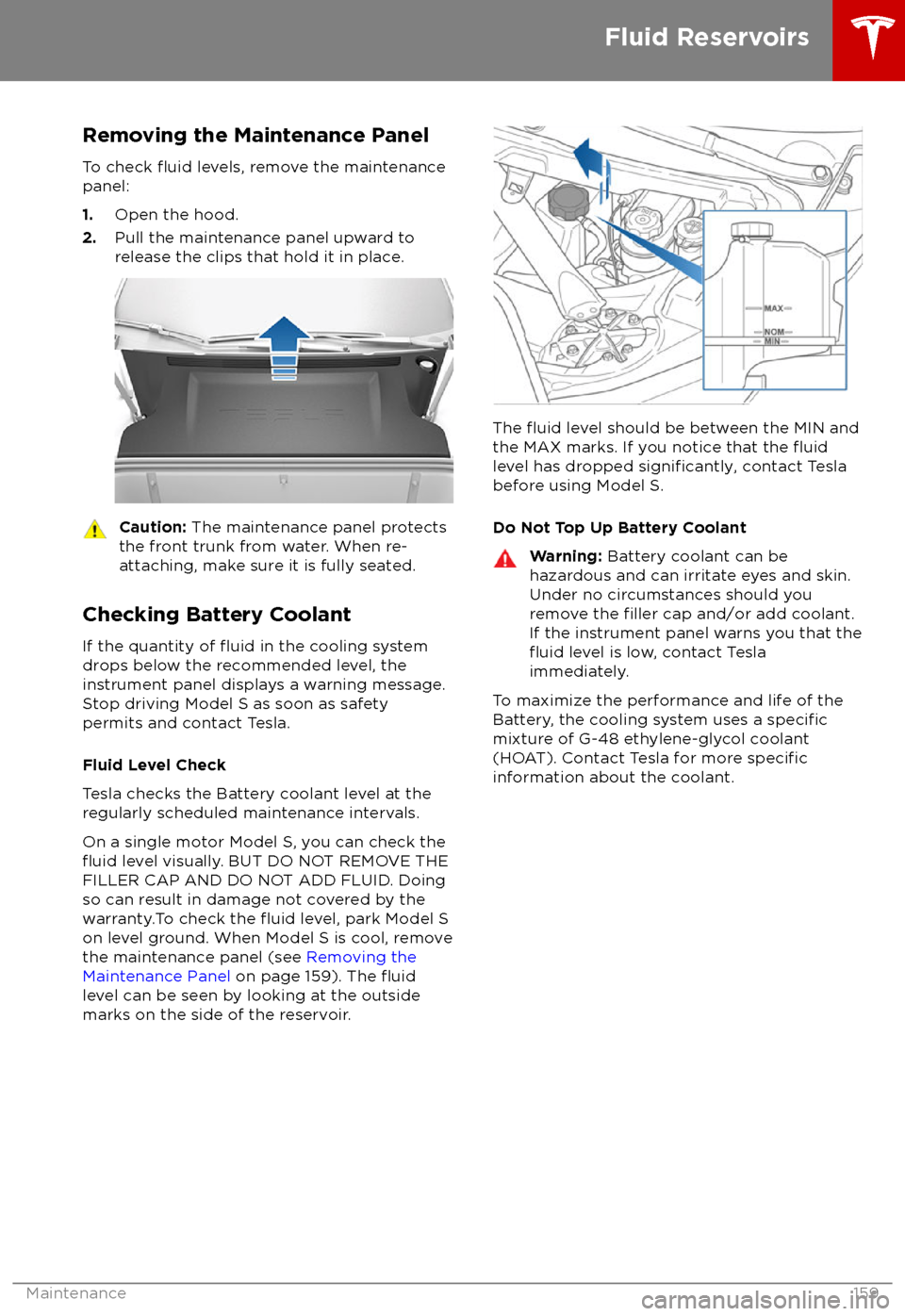
Removing the Maintenance PanelTo check
fluid levels, remove the maintenance
panel:
1. Open the hood.
2. Pull the maintenance panel upward to
release the clips that hold it in place.
Caution: The maintenance panel protects
the front trunk from water. When re-
attaching, make sure it is fully seated.
Checking Battery Coolant
If the quantity of
fluid in the cooling system
drops below the recommended level, the
instrument panel displays a warning message.
Stop driving Model S as soon as safety
permits and contact Tesla.
Fluid Level Check
Tesla checks the Battery coolant level at the
regularly scheduled maintenance intervals.
On a single motor Model S, you can check the
fluid level visually. BUT DO NOT REMOVE THE
FILLER CAP AND DO NOT ADD FLUID. Doing
so can result in damage not covered by the
warranty.To check the
fluid level, park Model S
on level ground. When Model S is cool, remove
the maintenance panel (see Removing the
Maintenance Panel on page 159). The
fluidlevel can be seen by looking at the outside
marks on the side of the reservoir.
The fluid level should be between the MIN and
the MAX marks. If you notice that the fluidlevel has dropped significantly, contact Tesla
before using Model S.
Do Not Top Up Battery Coolant
Warning: Battery coolant can be
hazardous and can irritate eyes and skin.
Under no circumstances should you
remove the
filler cap and/or add coolant.
If the instrument panel warns you that the
fluid level is low, contact Tesla
immediately.
To maximize the performance and life of the
Battery, the cooling system uses a specificmixture of G-48 ethylene-glycol coolant
(HOAT). Contact Tesla for more specificinformation about the coolant.
Fluid Reservoirs
Maintenance159
Page 161 of 195

Checking Brake FluidWarning: Contact Tesla immediately if
you notice increased movement of the brake pedal or a
significant loss of brakefluid. Driving under these conditions can
result in extended stopping distances or complete brake failure.
The Brake indicator on the
instrument panel alerts you if the
quantity of
fluid in the brake
reservoir drops below the
recommended level. If it displays
while driving, stop as soon as safety
permits by gently applying the
brakes. Do not continue driving.
Contact Tesla immediately.
Fluid Level Check
Tesla checks the brake
fluid level at the
regularly scheduled maintenance intervals. To
check it yourself, park Model S on level
ground. When Model S is cool, remove the
maintenance panel (see Removing the
Maintenance Panel on page 159).
Check the fluid level visually by looking at the
outside marks on the side of the reservoir
without removing the
filler cap.
The brake
fluid level should always be
between the MIN and the MAX marks.
Note: Although brake
fluid level drops slightly
during normal use as a result of brake pad
wear, it should not drop below the MIN mark.
Topping Up the Brake Fluid
Do not top up your brake
fluid. Tesla service
does this when you bring Model S in for
regular servicing. The following instructions
are provided for information purposes and future reference only:
1. Clean the filler cap before removing it to
prevent dirt from entering the reservoir.
2. Unscrew the cap and remove it.
3. Top up the reservoir to the MAX mark
using the appropriate brake
fluid.4. Replace the filler cap, ensuring it is fully
secured.
Warning: Only use new fluid from a
sealed air-tight container. Never use
previously used
fluid or fluid from a
previously opened container
Page 162 of 195
Topping Up Washer FluidThe only reservoir into which you can add
fluid is the washer fluid reservoir, which is
located behind the front trunk. When the level
is low, a message displays on the instrument panel.
Caution: Do not add formulated washerfluids that contain water repellent or bug
wash. These fluids can cause streaking,
smearing, and squeaking or other noises.
Operate the washers periodically to check that
the nozzles are clear and properly directed.
See Wipers and Washers on page 58.
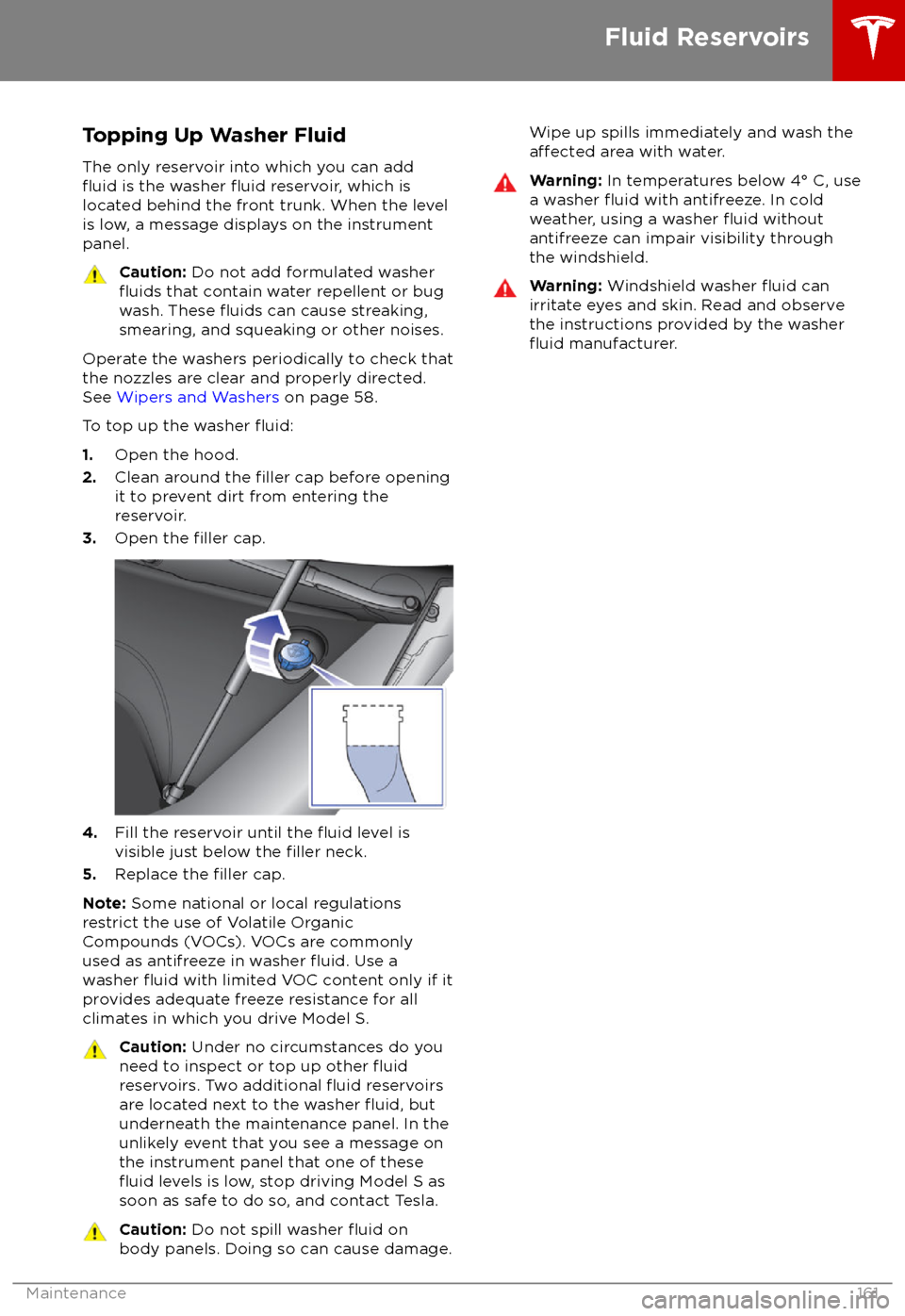
To top up the washer
fluid:
1. Open the hood.
2. Clean around the filler cap before opening
it to prevent dirt from entering the reservoir.
3. Open the
filler cap.
4.Fill the reservoir until the fluid level is
visible just below the filler neck.
5. Replace the filler cap.
Note: Some national or local regulations
restrict the use of Volatile Organic
Compounds (VOCs). VOCs are commonly
used as antifreeze in washer
fluid. Use a
washer fluid with limited VOC content only if it
provides adequate freeze resistance for all climates in which you drive Model S.
Caution: Under no circumstances do you
need to inspect or top up other fluidreservoirs. Two additional fluid reservoirs
are located next to the washer fluid, but
underneath the maintenance panel. In the
unlikely event that you see a message on the instrument panel that one of these
fluid levels is low, stop driving Model S as
soon as safe to do so, and contact Tesla.
Caution: Do not spill washer fluid on
body panels. Doing so can cause damage.Wipe up spills immediately and wash theaffected area with water.Warning: In temperatures below 4